Ergonomics 101: Setting Up Your Workspace
Learn the fundamentals of proper ergonomics to prevent workplace injuries and improve comfort throughout your workday.
Damian Jankowski, PT, DPT, MBA
January 15, 2026
8 min read
Understanding Ergonomics
Ergonomics is the science of designing and arranging your workspace to fit your body’s needs. Proper ergonomics can help prevent injuries, reduce discomfort, and improve productivity. By making small adjustments to your workspace and incorporating healthy habits, you can create a more comfortable and efficient environment.
This is for educational purposes only and is not considered professional medical advice. Always follow the guidance of your healthcare providers regarding your specific condition and recovery plan or contact a physical therapist for a personalized evaluation.
Key Principles of Ergonomics
To set up an ergonomic workspace, consider the following principles:
- Neutral Posture: Keep your body in a natural, relaxed position to reduce strain on muscles and joints.
- Minimize Repetitive Movements: Avoid repetitive tasks or take frequent breaks to prevent overuse injuries.
- Proper Support: Use ergonomic chairs and accessories to support your back, neck, and wrists.
- Adjustability: Ensure your workspace can be adjusted to fit your body’s unique needs.
Sample Exercises for Workplace Health
Incorporating simple exercises into your daily routine can help alleviate tension and improve your posture. Here are some exercises you can try:
- Neck Stretches: Slowly tilt your head to one side, bringing your ear toward your shoulder. Hold for 15-20 seconds and repeat on the other side.
- Shoulder Rolls: Roll your shoulders forward and backward in a circular motion to release tension.
- Seated Spinal Twist: Sit on your chair, place your right hand on the backrest, and gently twist your torso to the right. Hold for 15 seconds and repeat on the left side.
- Wrist Stretches: Extend one arm in front of you with your palm facing up. Use your other hand to gently pull your fingers back toward your body. Hold for 10-15 seconds and switch hands.
How to Set Up Your Workspace
Follow these steps to create an ergonomic workspace:
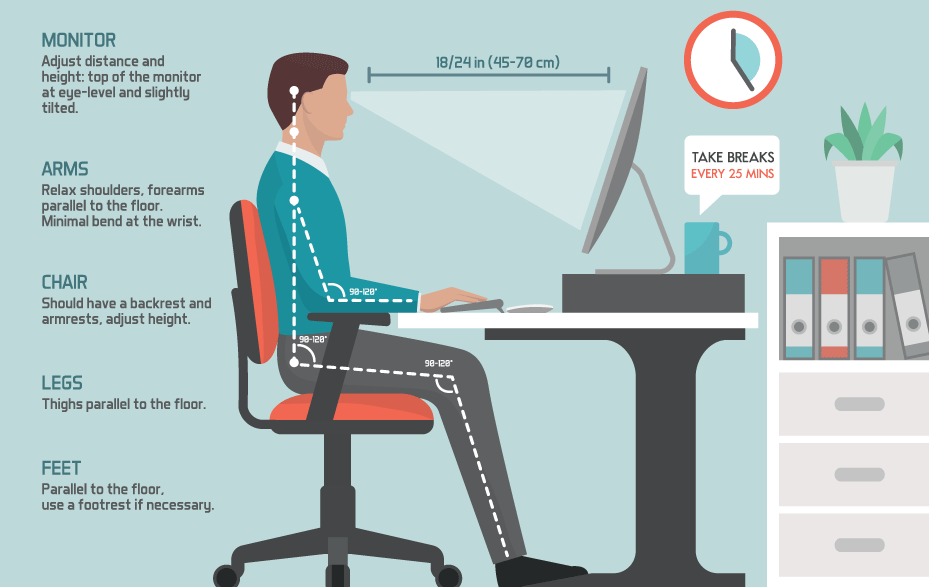
- Desk Height: Adjust your desk so your elbows are at a 90-degree angle when typing.
- Monitor Position: The top of your monitor should be at or slightly below eye level, about an arm’s length away.
- Chair Setup: Ensure your feet are flat on the floor, your thighs are parallel to the ground, and there’s proper lumbar support.
- Lighting: Use adequate lighting to reduce eye strain and avoid glare on your screen.
- Lumbar rolls: Rolls and supports come in various sizes and shapes. The type roll doesn't matter as long as it is comfortable - even a rolled-up towel can do the trick.
How Touchpoint PT Can Help
At Touchpoint PT, we take a comprehensive approach to addressing your low back pain and overall musculoskeletal health. Our team of experienced physical therapists can help you by:
- Free ergonomic audit: We offer a free virtual ergonomic audit to assess your workspace and provide personalized recommendations.
- Posture Evaluation: We can assess your posture to identify any imbalances or misalignments that may be contributing to your discomfort.
- Optimize workspace: Our therapists evaluate your workspace setup to identify ergonomic improvements that can reduce strain and enhance comfort.
- Specialized Education: We provide tailored guidance on workplace and home environment modifications to optimize ergonomics, reduce pain, and prevent future injuries.